bConnected @ Ball State3.3
Publisher Description
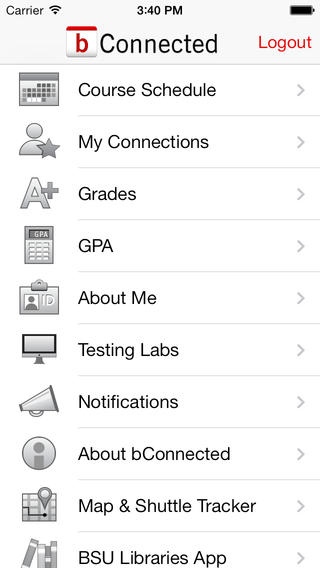
bConnected is the first app of its kind for Ball State students, providing anytime, anyplace access to your class schedules, classmates and instructors, grades, calendars and important academic reminders. Designed for mobile devices, bConnected provides information when and where you need it most. You can also create connections based on your classmates and course instructors.
Features:
Important academic reminders
A history of notifications sent to you
Course schedule - course info, classmates, instructors and tutors
My Connections a favorites list for all the people you interact with at Ball State
Final course grades
Midterm course performance
GPA
Tutoring information for University Core Curriculum courses
Campus rideboard for sharing rides
Events, viewable by category and month
Local information and quick access to your Ball State ID
Advisors
Pending degrees
Academic performance
University holds
Photos of campus buildings for courses, events and housing
A quick link to the Campus Map and Shuttle Tracker application
A demo account is available if you don't have a Ball State username - just use the following credentials:
Username: bconnected
Password: demo
What's New in Version 2.0
Adds push notifications for important academic reminders
Updated for the 2012-2013
Links to Ball State Campus Map app (with brand new shuttle tracker)
Minor bug fixes
Requires iOS 4.3 or later. Compatible with iPhone, iPad, and iPod touch.
About bConnected @ Ball State
The company that develops bConnected @ Ball State is Ball State University (Information Technology). The latest version released by its developer is 3.3.
To install bConnected @ Ball State on your iOS device, just click the green Continue To App button above to start the installation process. The app is listed on our website since 2012-03-08 and was downloaded 4 times. We have already checked if the download link is safe, however for your own protection we recommend that you scan the downloaded app with your antivirus. Your antivirus may detect the bConnected @ Ball State as malware if the download link is broken.
How to install bConnected @ Ball State on your iOS device:
- Click on the Continue To App button on our website. This will redirect you to the App Store.
- Once the bConnected @ Ball State is shown in the iTunes listing of your iOS device, you can start its download and installation. Tap on the GET button to the right of the app to start downloading it.
- If you are not logged-in the iOS appstore app, you'll be prompted for your your Apple ID and/or password.
- After bConnected @ Ball State is downloaded, you'll see an INSTALL button to the right. Tap on it to start the actual installation of the iOS app.
- Once installation is finished you can tap on the OPEN button to start it. Its icon will also be added to your device home screen.
